Jima Caller ID2.27
Publisher Description
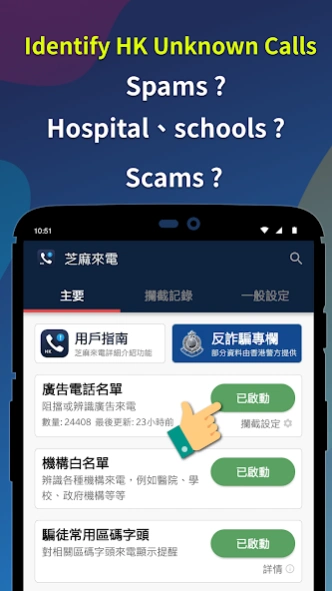
Block and Identify Hong Kong Junk Calls
Designed for Hong Kong users, Jima Caller Id cope with the spam calls problem : there are too many spam calls, among those some are even scams.
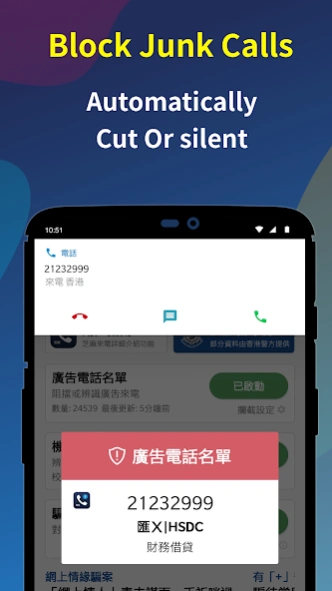
【 Call Blocking & Identification 】「Block」or「Identify」incoming hong kong junk calls
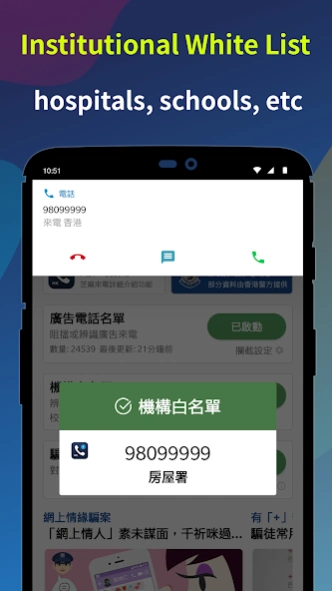
【 Institutional White-List 】Identify calls from institutes, e.g. hospital, schools... etc
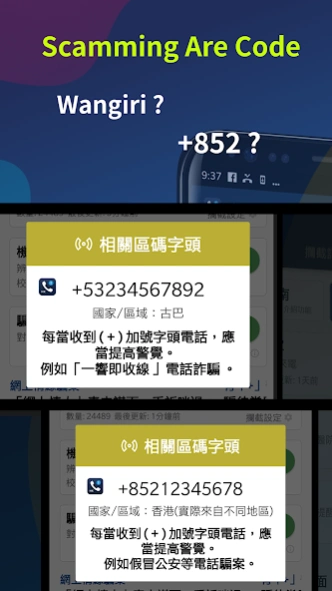
【 Scamming Area Code 】Prompt for scamming prefix
【 Query Spam Call Databases 】 More than 10K records, adopted hkjunkcall.com database, spam calls are collected daily and updating the database. You could offline query whether a call is a spam call
【 Report Spam Call 】Everyone contribute to flight against spam call
【 Whitelist 】add your own numbers to exclude from blocking
【 Blacklist 】add your own number to blocking
【 Customisation 】Actions to different category of spam calls could be set to "Block" or "Identify" according to your needs.
【 Auto update 】The app could update the database automatically on the background without your intervention.
【 Scams Alert 】App also provide scam alerts from the Hong Kong Policy force
P.S. This app won Best Smart Hong Kong (Public Sector Information Application) Certificate of Merit, HKICT awards 2016.
About Jima Caller ID
The company that develops Jima Caller ID is TechmaxApp. The latest version released by its developer is 2.27.
To install Jima Caller ID on your Android device, just click the green Continue To App button above to start the installation process. The app is listed on our website since 2024-03-08 and was downloaded 1 times. We have already checked if the download link is safe, however for your own protection we recommend that you scan the downloaded app with your antivirus. Your antivirus may detect the Jima Caller ID as malware as malware if the download link to com.techmaxapp.hongkongjunkcalls is broken.
How to install Jima Caller ID on your Android device:
- Click on the Continue To App button on our website. This will redirect you to Google Play.
- Once the Jima Caller ID is shown in the Google Play listing of your Android device, you can start its download and installation. Tap on the Install button located below the search bar and to the right of the app icon.
- A pop-up window with the permissions required by Jima Caller ID will be shown. Click on Accept to continue the process.
- Jima Caller ID will be downloaded onto your device, displaying a progress. Once the download completes, the installation will start and you'll get a notification after the installation is finished.
Program Details
System requirements
Download information
Pricing
Version History
version 2.27
posted on 2024-03-08
Removing the read_call_log permission
version 2.22
posted on 2023-11-09
update to Android 13
fix update bugs
bug fixes
version 2.21
posted on 2023-11-06
update to Android 13
fix update bugs
minor bug fixes
version 2.18
posted on 2021-12-25
added privacy policy URL
version 2.17
posted on 2021-12-22
minor bug fix
version 2.12
posted on 2020-06-21
- Fixed a bug where an old version of ad serving plugin is picked up by malware scanner
- Added help content on how to enable auto-start feature in Samsung and Oppo phones
- Added disclosure/consent about redirecting to or sharing data with hkjunkcall.com when reporting or searching info on suspicious incoming calls
- Added option to opt-out of auto report feature during initial permission setup screen
- Increase app stability
version 2.9
posted on 2020-06-01
Fixed a bug where users for some phones may get stuck in permission setting screen and can't proceed further.
version 2.8
posted on 2020-05-04
Fixed the following issues on Android 10:
1) When receiving an incoming Whatsapp call, app will erroneously recognize as unknown/private number and try to block
2) When already on a call, another call comes in, and is recognized as a number to block, the current call gets cut off.
*** For users with phones running Android 10, please run the app after app update to complete additional setup ***
version 2.7
posted on 2020-02-16
Fixed issue when reporting bug/feedback via email in "settings" page, no auto-fill of email subject, email address, etc. when using Gmail app.
version 2.6
posted on 2019-11-30
1. Fixed a bug where, after upgrading to Android 10, app fails to intercept calls
2. Fixed a bug when searching phone numbers will yield hkjunkcall.com webpage not found issue
3. Fixed a bug when, after adding number from call log to black/white list and try to edit number, the wrong country code is assigned
